Understanding Microsoft Office Licensing Options
Microsoft Office is a suite of productivity applications that has become essential for both personal and professional tasks. With different licensing options available, understanding how to acquire this software can help users make informed decisions. The choice between subscription-based models and one-time purchases can impact both functionality and cost over time.When considering Microsoft Office, users have primarily two licensing options: subscription-based and one-time purchase models.
The subscription-based model, known as Microsoft 365, provides users with continuous access to the latest features, cloud services, and updates for a monthly or annual fee. In contrast, the one-time purchase model gives users the software for a fixed price, but it does not include future updates or cloud services.
Differences Between Subscription-Based and One-Time Purchase Models
The differences between these two models are significant and cater to varied user needs. Below are key distinctions:
- Cost Structure: A subscription requires ongoing payments, while a one-time purchase involves a single upfront cost.
- Updates and Features: Subscription models provide regular updates and new features as they are released, whereas one-time purchases may become outdated unless upgraded.
- Cloud Services: Subscriptions often include cloud storage and collaboration tools, enhancing teamwork and accessibility.
- Licensing Flexibility: Subscriptions allow for easy management of licenses across multiple devices and users; one-time purchases are typically tied to a single device.
Examples of Microsoft Office Versions Available for One-Time Purchase
For those inclined towards a one-time purchase model, there are several versions of Microsoft Office available. These versions are designed for different user needs, making it easier to find the right fit for productivity and budget.
- Office Home & Student 2021: Includes essential applications such as Word, Excel, and PowerPoint, suitable for basic home and educational use.
- Office Home & Business 2021: Expands on the Home & Student version by adding Outlook, making it ideal for small business owners and professionals.
- Office Professional 2021: Offers a comprehensive suite including Word, Excel, PowerPoint, Outlook, Publisher, and Access, catering to advanced users who require all applications for extensive business tasks.
Choosing the right licensing option for Microsoft Office can enhance your productivity, whether you prefer the flexibility of a subscription or the certainty of a one-time purchase.
One-Time Purchase vs. Subscription Model
When considering Microsoft Office, users often face a pivotal choice between a one-time purchase and a subscription model. Each option brings its unique advantages and disadvantages that can significantly impact your budget and software experience. Understanding these differences is essential for making an informed decision tailored to your needs.The one-time purchase of Microsoft Office allows users to pay a single upfront cost for a perpetual license to the software.
In contrast, the subscription model offers a flexible, pay-as-you-go approach, granting access to the latest features and updates for a recurring fee. Both methods come with distinct financial implications and differing access to features.
Pros and Cons of One-Time Payment
Choosing to buy Microsoft Office as a one-time payment has both advantages and disadvantages. Here are the essential points to consider:
- Cost-Effective for Long-Term Use: A one-time payment can be more economical for users who plan to use the software for many years without needing frequent updates.
- Ownership: Users own the software permanently, without worrying about future payments or subscription renewals.
- Lack of Ongoing Costs: After the initial purchase, no further payments are necessary, which can simplify budgeting.
- Limited Updates: Users miss out on significant updates and new features that are released after their purchase, unless they pay for a newer version.
- Compatibility Issues: Over time, older versions may not be compatible with newer file formats or systems, affecting usability.
Long-Term Cost Comparison
When analyzing the long-term costs between the one-time purchase and the subscription model, it’s crucial to consider the duration of use and software updates. For example, if a user purchases Microsoft Office 2021 for a one-time cost of around $150, they will retain that version indefinitely. However, over a span of 5 years, subscribing to Microsoft 365 at around $70 per year totals approximately $350.
| Payment Option | Initial Cost | 5-Year Total Cost |
|---|---|---|
| One-Time Purchase | $150 | $150 |
| Subscription Model | $70/year | $350 |
While the one-time purchase may seem more economical, it’s important to also consider the ongoing value of updates and new features included in the subscription model.
Features and Updates in Each Model
The offerings in a one-time purchase versus a subscription can differ significantly, particularly regarding updates and additional features. Below are the key aspects:
- One-Time Purchase: Typically includes a limited set of features and may not receive major updates, meaning users could miss out on new tools and enhancements.
- Subscription Model: Provides continuous access to the latest features, regular updates, and enhancements, ensuring users are always working with the most current tools.
- Cloud Services: Subscriptions often include cloud storage options (OneDrive), enabling users to save and access files from anywhere, enhancing collaboration and productivity.
- Access to Additional Applications: Microsoft 365 subscriptions may offer more applications, such as Access, Publisher, and additional services like Teams, which can be beneficial for both personal and professional use.
“Choosing the right licensing option for Microsoft Office is essential for optimizing both cost-efficiency and productivity.”
How to Purchase Microsoft Office without a Subscription
If you prefer owning your software outright rather than subscribing, purchasing Microsoft Office without a subscription is a straightforward process. This option allows you to have a permanent license for the software you need without the ongoing costs associated with a subscription model. Below, we Artikel the essential steps to make this purchase, ensuring you choose the right product and retailer.When considering buying Microsoft Office as a one-time purchase, it’s crucial to understand where to buy it and how to confirm the legitimacy of the product.
Here are the steps to guide you through the process:
Step-by-Step Guide to Purchasing Microsoft Office
To ensure a smooth and successful purchase of Microsoft Office, follow these steps:
1. Choose the Right Version
Determine which version of Microsoft Office best suits your needs, such as Office Home & Student, Office Home & Business, or Office Professional.
2. Identify Authorized Retailers
Purchase your software from well-known retailers to ensure authenticity. Some authorized retailers include: – Amazon
Best Buy
– Walmart The Microsoft Store (online and physical locations)
3. Visit the Retailer’s Website or Store
Navigate to the website of your chosen retailer or visit their physical store to find the selected Microsoft Office version.
4. Select Product and Add to Cart
Once you’ve found the appropriate version, add it to your cart and proceed to checkout.
5. Complete Your Purchase
Enter your payment information and finalize your transaction. Ensure you receive a confirmation email with order details.
6. Download or Receive Physical Copy
Depending on your purchase type, you may receive a download link via email or a physical box with a product key.To ensure you are buying a legitimate copy of Microsoft Office, consider the following tips:
Ensuring the Legitimacy of Your Microsoft Office Purchase
When making a significant software investment, it’s vital to verify that you’re acquiring a genuine product. Here are some tips to ensure your purchase is legitimate:
Look for Official Packaging
Authentic Microsoft Office products come in sealed packaging that includes the product key. Counterfeit versions often have poor quality packaging.
Check for Product Activation
Genuine copies require activation through Microsoft’s servers. If a product claims to be a legitimate copy but doesn’t require activation, it may be a fake.
Beware of Unusually Low Prices
If a deal seems too good to be true, it likely is. Do some price comparisons across authorized retailers to gauge fair pricing.
Purchase from Reputable Sources Only
Stick to authorized retailers and the official Microsoft Store for your purchases. Avoid third-party sellers on marketplaces like eBay unless they are verified.
“Purchasing Microsoft Office outright ensures you have complete control over your software without recurring fees.”
By following this guide, you can confidently purchase Microsoft Office without a subscription and enjoy all the features without worrying about ongoing costs.
Compatibility and Support for Non-Subscription Versions
Microsoft Office offers various licensing options designed to cater to different user needs. For those who prefer a one-time purchase over a subscription model, understanding compatibility and support for non-subscription versions is essential. These versions maintain robust functionality while ensuring compatibility with a range of operating systems and provide reliable support options for users.The non-subscription versions of Microsoft Office are designed to be compatible with major operating systems, making them accessible to a wide audience.
Users can install these versions on supported Windows and Mac operating systems, allowing for a seamless experience across different devices.
Compatibility with Operating Systems
Users of non-subscription versions can expect a well-rounded compatibility experience. Below is a detailed overview of the supported operating systems:
- Windows: Microsoft Office one-time purchase versions are compatible with Windows 10 and later versions, ensuring that users on newer systems can fully utilize the software.
- Mac: For Mac users, Microsoft Office is compatible with macOS Mojave (10.14) and later, accommodating those who prefer Apple’s ecosystem.
- Mobile Devices: While the desktop versions are not available for mobile, users can access Microsoft Office applications through free mobile apps designed for Android and iOS, ensuring productivity on the go.
Support Options for Non-Subscription Purchases
When opting for a one-time purchase of Microsoft Office, users are entitled to specific support options designed to assist with installation and troubleshooting. Here’s an overview of the available support:
- Technical Support: Users can access technical support through Microsoft’s official website, where FAQs and troubleshooting guides are available for common issues.
- Community Forums: Microsoft provides community forums where users can share experiences and solutions, enhancing user engagement and assistance.
- Updates: One-time purchase versions are eligible for significant updates and features, but they may not receive the same frequency of updates as subscription versions.
Comparison of Features
Understanding the differences in features between non-subscription and subscription versions helps users make informed choices. The table below highlights key features available in each version:
| Feature | Non-Subscription Version | Subscription Version |
|---|---|---|
| Access to Microsoft Office Apps | Yes, limited to installed apps | Yes, includes full suite and web versions |
| Monthly Updates | No, occasional major updates | Yes, regular updates and new features |
| Cloud Storage | No | Yes, includes OneDrive storage |
| User Licenses | One-time purchase for one user | Multiple users with family or business plans |
| Technical Support | Limited to online resources | 24/7 support available |
Choosing a Microsoft Office version is about balancing features with needs. Non-subscription versions offer solid functionality, while subscription models provide continual enhancements and support.
User Experience and Feedback
Many users have shared their experiences regarding the one-time purchase option for Microsoft Office, highlighting both advantages and drawbacks. With a significant number of individuals opting for this model, it has become essential to understand their perspectives and the impact of their choices on their productivity.The feedback from users reflects a diverse range of experiences, predominantly focused on the functionality, cost-effectiveness, and longevity of the software.
Users frequently express their satisfaction with the ability to own their software outright, leading to a feeling of independence from ongoing payments. However, there are also some common concerns regarding updates and compatibility with newer technologies.
Common Experiences and Feedback
User testimonials reveal a variety of sentiments towards the one-time purchase option. Below is a summary of frequently mentioned advantages and disadvantages drawn from user reviews.Many users appreciate the following benefits:
- Ownership: Users enjoy the freedom of owning their software without the pressure of recurrent payments.
- Cost-Effectiveness: Many find the one-time purchase advantageous in the long run, especially for those who do not require regular updates.
- Stability: The installed version offers reliable performance without relying on internet connectivity.
- Familiarity: Users often feel more comfortable with a familiar interface, especially long-time users who prefer not to adjust to subscription-based updates.
Conversely, users have also raised several concerns:
- Limited Updates: Feedback indicates that users miss out on frequent feature updates available to subscription members.
- Compatibility Issues: Some users experience challenges when sharing documents or collaborating with others who use the latest versions of Office.
- Higher Initial Cost: While the long-term cost may be less, the upfront price can be a significant barrier for some users.
- Support Limitations: Users have noted that support may be less robust compared to those on subscription plans.
“Owning my copy of Microsoft Office has given me peace of mind. I don’t have to worry about monthly fees, and I love not being tied to an internet connection to access my work.”
Office User
Overall, the user feedback surrounding one-time purchases of Microsoft Office reflects a balance of satisfaction and concern, underscoring the importance of understanding personal needs when choosing between ownership and subscription models.
Alternatives to Microsoft Office
In today’s digital workspace, users increasingly seek alternatives to Microsoft Office that offer similar functionality without the burden of a subscription. Various office suites provide robust features and capabilities that can meet diverse needs, from simple document creation to complex data analysis. Here, we explore several noteworthy alternatives that stand out in terms of performance, features, and pricing.Many users may not realize that there are several excellent office suites available that do not require a subscription.
These alternatives not only provide essential productivity tools but also come with a range of features tailored to different user preferences. Below is a list of some popular alternatives to Microsoft Office, along with their key features and pricing information.
Top Alternatives to Microsoft Office
These alternatives cater to a variety of needs and budgets, ensuring you can find the right fit for your workflow:
- LibreOffice
LibreOffice is a powerful, free, open-source office suite that includes applications for word processing, spreadsheets, presentations, and more. Its compatibility with Microsoft Office formats makes it an ideal choice for users who require seamless file sharing.
LibreOffice offers a robust set of features comparable to Microsoft Office, without the cost.
- Apache OpenOffice
Similar to LibreOffice, Apache OpenOffice is a free suite that includes tools for writing, spreadsheet management, and presentations. It provides users with a user-friendly interface and strong community support.
OpenOffice supports a variety of file formats, ensuring versatility in document handling.
- WPS Office
WPS Office offers a free version with premium features available for purchase. The suite includes Writer, Presentation, and Spreadsheets, and boasts a familiar interface for those accustomed to Microsoft Office.
The free version of WPS Office is ad-supported but provides robust functionality.
- Google Workspace
While primarily a cloud-based solution, Google Workspace provides a free tier for personal use, featuring Docs, Sheets, and Slides. The collaborative features and real-time editing capabilities make it a favorite for teams.
Google Workspace excels in collaboration, allowing multiple users to work simultaneously.
- OnlyOffice
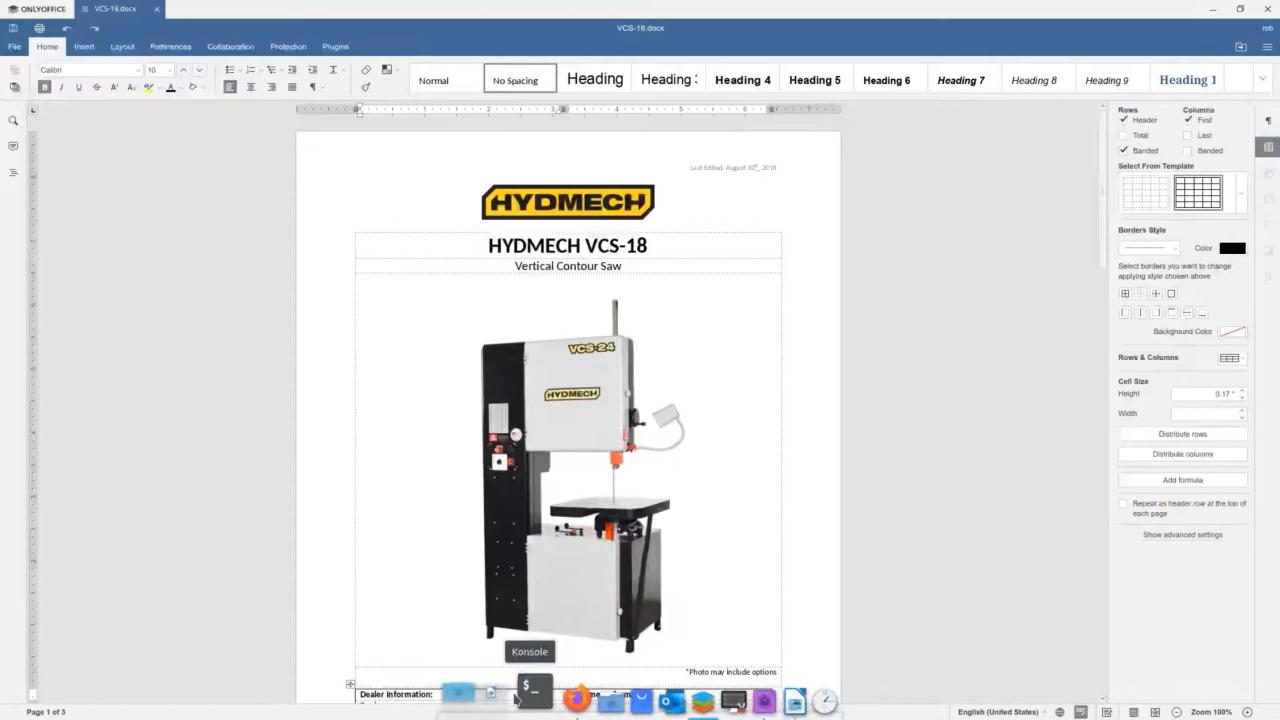
OnlyOffice provides a free community edition that includes document, spreadsheet, and presentation editors. It offers strong compatibility with Microsoft formats and is suitable for collaborative work.
OnlyOffice’s integration capabilities with cloud storage services add to its appeal.
Comparing these alternatives to Microsoft Office reveals that while Microsoft Office maintains a higher profile, these office suites deliver essential features that can adequately meet user needs. For example, LibreOffice and OpenOffice closely mimic the capabilities of Microsoft Word and Excel but without the associated costs.When it comes to pricing, most of these alternatives offer free versions or community editions, making them accessible to individual users and small businesses.
In contrast, Microsoft Office typically requires a subscription or a one-time purchase, which may not be suitable for everyone.In summary, there are several viable alternatives to Microsoft Office that provide quality features and functionalities without the ongoing commitment of a subscription. Users looking to simplify their office software expenses will find these options particularly appealing, whether for personal use or within a collaborative workplace environment.
Future of Microsoft Office Licensing
The evolution of software licensing has reached a pivotal moment, especially as Microsoft Office continues to adapt to changing user demands and technological advancements. Understanding the future trajectory of Microsoft Office licensing is crucial for users contemplating their options. As the landscape shifts, it’s essential to stay informed about potential changes that could impact both one-time purchases and subscription models.Microsoft has shown a clear trend towards embracing cloud-based solutions, which reflects broader industry movements towards Software as a Service (SaaS) models.
In recent announcements, Microsoft indicated plans to expand its subscription offerings while continuing to support one-time purchase options. This dual approach aims to cater to diverse user preferences, ensuring that both casual and professional users have access to the tools they need without being forced into a particular model.
Trends in Software Licensing and Impact on Microsoft Office
The software licensing landscape is evolving, influenced by several key trends that may significantly impact the future of Microsoft Office:
- Increased Emphasis on Subscriptions: The trend towards subscription-based models is growing, with many companies, including Microsoft, focusing on providing ongoing value through regular updates and enhancements.
- Cloud Integration: Cloud services are becoming more integral, allowing users to access Office applications from any device, enhancing flexibility and collaboration.
- AI and Automation Features: The integration of artificial intelligence within software applications is transforming user experiences, making tools more intuitive and efficient. Microsoft is expected to develop these capabilities further in its licensing models.
- Consumer Preferences: Users are increasingly favoring flexible payment options, leading Microsoft to refine its offerings to meet diverse budget needs.
The shift towards subscriptions is not merely a strategy to generate recurring revenue; rather, it reflects a commitment to continuously enhance user experiences. By focusing on cloud-based functionalities, Microsoft is making it easier for teams to collaborate and share information seamlessly.
“The future will likely see a hybrid approach that balances the benefits of both subscription services and one-time purchases, accommodating the growing demand for flexibility among users.”
As the landscape of Microsoft Office licensing continues to evolve, users considering one-time purchases should stay informed about these trends. Understanding how these changes may affect their options will ensure they can make educated decisions that best suit their needs in an increasingly digital world.
FAQ Explained
Can I use Microsoft Office offline if I purchase it?
Yes, one-time purchase versions of Microsoft Office can be used offline without an internet connection.
Is there a trial version available for non-subscription Office?
No, Microsoft typically does not offer trial versions for one-time purchases, but you can try subscription versions.
Will I receive updates with the one-time purchase version?
You will receive security updates, but major upgrades to new versions require a separate purchase.
How long does my purchased Microsoft Office last?
Your purchase lasts indefinitely, but you’ll miss out on newer features unless you upgrade to a newer version.
Can I transfer my Microsoft Office license to another computer?
Yes, you can transfer your license, but it may require uninstalling the software from the original device first.