Overview of Adobe Subscription
Purchasing an Adobe subscription opens the door to a world of creative possibilities and unparalleled productivity tools. Whether you are a professional designer, a photographer, or someone who dabbles in creative projects, Adobe’s suite of applications caters to all your needs, providing you with cutting-edge features that elevate your work to the next level.The advantages of an Adobe subscription are numerous, ensuring users have access to the latest updates, cloud storage, and a vibrant community of creatives.
By subscribing, you gain the flexibility to choose the right plan according to your specific requirements, whether it’s for individual use, teams, or educational purposes.
Types of Adobe Subscriptions
Adobe offers various subscription options designed to accommodate differing needs and workflows. Here’s a breakdown of the principal types of subscriptions available:
- Adobe Creative Cloud All Apps: This plan provides access to over 20 creative applications, including Photoshop, Illustrator, and InDesign. It’s ideal for professionals who utilize multiple tools.
- Single App Subscription: For those who need only one specific application, this plan allows users to subscribe to tools like Lightroom or Premiere Pro separately, making it a cost-effective choice.
- Photography Plan: Tailored for photographers, this subscription includes Lightroom and Photoshop, along with 1TB of cloud storage, perfect for managing large photo collections.
- Students and Teachers: Adobe offers discounts for educational purposes, allowing students and educators to access Creative Cloud at a significantly reduced price.
Monthly vs. Annual Payment Options
Understanding the payment structure of Adobe subscriptions is essential for making an informed decision. Adobe provides both monthly and annual payment options, each with its respective benefits.
- Monthly Plan: This option allows for more flexibility, enabling users to subscribe on a month-to-month basis without a long-term commitment. It is perfect for those needing the software temporarily or who prefer short-term access.
- Annual Plan: By choosing an annual subscription, users typically enjoy cost savings compared to the monthly plan, as it is billed at a lower monthly rate when paid upfront. This plan is ideal for individuals and teams committed to long-term projects.
“Opting for an annual plan often results in significant savings, making it the preferred choice for serious creatives.”
When deciding between the two options, consider how frequently you will use Adobe software and your budget constraints. Each plan provides unique advantages tailored to different user needs, ensuring everyone can find the right fit for their creative journey.
Steps to Purchase an Adobe Subscription
Purchasing an Adobe subscription is a straightforward process designed to provide users with access to industry-leading creative tools. Following the right steps will ensure a seamless experience as you embark on your creative journey with Adobe.
Creating an Adobe Account
To begin your subscription process, you must first create an Adobe account. This account will be your gateway to all Adobe services and resources. The steps to create an account are simple and user-friendly:
- Visit the Adobe website and click on “Sign In” at the top right corner.
- Select “Create an account” and enter the required information, including your first and last name, email address, and a secure password.
- Review and accept the Terms of Use and Privacy Policy.
- Click “Create an account.” A verification email will be sent to your inbox.
- Check your email and click on the verification link to activate your account.
This account provides access to your subscriptions, billing information, and personalized settings.
Selecting and Purchasing a Specific Adobe Subscription
After creating your Adobe account, the next step is to select and purchase a subscription that meets your needs. Adobe offers various plans tailored for individuals, students, and businesses. Here’s how you can select and purchase a subscription:
- Log in to your Adobe account.
- Navigate to the “Plans” section available on the website.
- Explore the different subscription options and click on the plan that suits your requirements.
- Review the details of the selected plan, including features, pricing, and any special offers available.
- Click on “Buy Now” to proceed with the purchase.
Understanding the features and pricing of each plan will help you make an informed choice.
Entering Payment Information Securely
Security is a priority during the payment process. Adobe employs robust encryption to protect your financial information. To ensure a safe transaction, follow these steps:
- On the payment page, select your preferred payment method, which may include credit/debit cards or PayPal.
- Enter your payment details in the fields provided, including card number, expiration date, and security code.
- Review your order summary to confirm all details are accurate before submitting your payment.
- Once satisfied, click on “Submit Payment.”
Always ensure your internet connection is secure when entering sensitive payment information to protect your data.
By following these steps, you can confidently purchase your Adobe subscription and unlock the creative tools that will elevate your projects and ideas.
Features of Adobe Subscription Plans
Adobe Subscription Plans are designed to provide creative individuals and teams with robust tools and resources that empower innovation and productivity. With a wide array of features tailored to different needs, these plans make it easier than ever to unleash your creativity and achieve professional results.One of the standout characteristics of the Adobe Creative Cloud subscription is its comprehensive suite of applications, which are essential for any creative project, from graphic design to video editing.
Subscribers gain access to industry-leading applications that streamline workflows and facilitate collaboration.
Included Tools in Adobe Subscriptions
The Adobe subscription package includes a variety of powerful tools that cater to different creative disciplines. Each tool offers unique capabilities that enhance the creative process and improve overall productivity.
- Adobe Photoshop: Renowned for its advanced photo editing and manipulation features, Photoshop is the go-to software for photographers and designers alike. It provides a plethora of filters, brushes, and plugins that enhance creativity.
- Adobe Illustrator: Ideal for vector-based design, Illustrator allows artists to create stunning illustrations and logos with precision. Its scalable graphics ensure that designs maintain quality at any size.
- Adobe Premiere Pro: A staple in the video editing industry, Premiere Pro offers a wide range of tools for editing videos, adding effects, and integrating sound. Its seamless integration with other Adobe apps enhances the editing experience.
- Adobe After Effects: For motion graphics and visual effects, After Effects provides the tools needed to create stunning animations and cinematic visuals, making it a favorite among video professionals.
- Adobe XD: This tool is perfect for designing and prototyping user experiences for web and mobile applications. Its collaborative features allow teams to work together seamlessly on design projects.
Cloud Storage Benefits
The Adobe subscription plans offer significant advantages in terms of cloud storage, which is critical for modern workflows. Subscribers benefit from ample cloud storage that allows for secure saving and sharing of projects, enabling easy collaboration and access from anywhere.The cloud storage features include:
Seamless Synchronization
All files are automatically synced across devices, ensuring that users have the latest version of their projects at their fingertips, no matter where they are.
Collaboration Tools
Teams can share projects and assets easily, facilitating real-time collaboration and feedback, which is essential for efficient project development.
Backup and Recovery
With files stored in the cloud, users can rest easy knowing that their work is backed up and can be restored in the event of accidental loss or data corruption.
Access to Adobe Fonts
Subscribers have access to a vast library of fonts that can be used across their projects, ensuring designer flexibility and creativity.
“Adobe’s Creative Cloud brings the power of collaboration and creativity together, paving the way for innovative designs and projects.”
The combination of industry-standard tools with robust cloud storage makes Adobe Subscription Plans an ideal choice for creatives looking to elevate their work and streamline their processes.
Managing Your Adobe Subscription
Managing your Adobe subscription is straightforward and user-friendly. Adobe provides a comprehensive online platform that allows users to access and modify their account settings, ensuring they have full control over their subscription experience. Whether you need to upgrade, downgrade, or cancel your subscription, the following guide will walk you through each process step-by-step.
Accessing and Managing Your Adobe Account Settings
To manage your Adobe subscription effectively, you first need to access your account settings. This is where you can view your current plans, billing information, and usage details. Here’s how to do it:
1. Log in to Your Adobe Account
Visit the Adobe website and click on the “Sign In” button. Enter your Adobe ID and password.
2. Navigate to Your Account
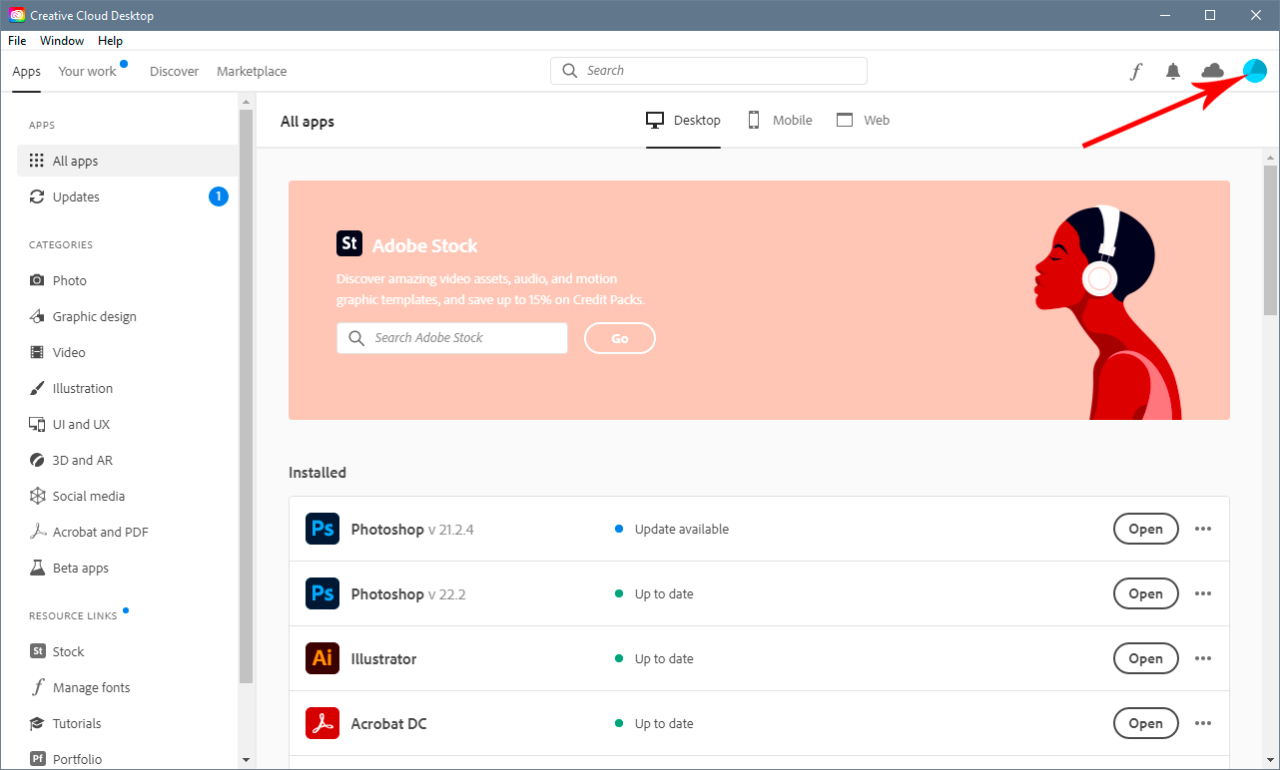
Once logged in, click on your profile icon in the upper right corner and select “Account” from the dropdown menu.
3. Review Your Subscription Information
In your account dashboard, you’ll find all relevant information, including your current subscription plan, renewal dates, and payment methods.
Upgrading or Downgrading Your Subscription Plan
If your needs change, Adobe makes it easy to modify your subscription plan. Upgrading or downgrading allows you to align your plan with your current project requirements. Here’s how to do it:To upgrade or downgrade your plan:
- Go to the Plans & Payment section of your account settings.
- You will see options for different plans. Choose the plan that suits your needs better.
- Follow the prompts to confirm your selection. Changes will take effect at the end of your current billing cycle, ensuring you maximize your existing subscription benefits.
Cancelling Your Adobe Subscription Effectively
Should you decide to cancel your Adobe subscription, it is crucial to follow the correct procedure to avoid unexpected charges. Here’s a clear guide:
Access the Account Settings
Just as you did to manage your subscription, log in and go to your account.
Navigate to Plans & Payment
Find the subscription you wish to cancel and select “Manage Plan.”
Initiate Cancellation
Click on “Cancel Plan.” Adobe will provide you with a brief survey to understand your reason for cancellation.
It’s important to note that cancellations take effect at the end of your billing cycle if you are on a yearly plan.
Confirm Cancellation
Follow the prompts to confirm your cancellation. You will receive a confirmation email once the cancellation process is complete.By following these guidelines, managing your Adobe subscription will become a hassle-free experience, empowering you to make the most out of your creative tools.
Cost Considerations for Adobe Subscriptions
Adobe subscriptions offer a range of pricing options tailored to different user needs, making it essential to understand the various costs involved. From individual plans to business and educational tiers, knowing how to navigate these options can maximize your investment in Adobe’s powerful suite of software.
Breakdown of Costs for Adobe Subscription Tiers
Adobe provides several subscription tiers to cater to diverse requirements and budgets. Here’s a closer look at the typical pricing structure:
- Individual Plans: Starting at approximately $20.99/month for a single app like Photoshop, or $54.99/month for the entire Creative Cloud suite, which includes access to over 20 apps.
- Business Plans: Ranging from $33.99/month per user for a single app to $79.99/month per user for the complete suite, these plans offer enhanced collaboration features and administrative controls.
- Student and Teacher Discounts: Students and educators can benefit from a significant discount, usually around 60%, bringing the cost down to approximately $19.99/month for the full suite.
Potential Discounts for Students or Educators
Adobe recognizes the financial constraints often faced by students and educators, thus providing special pricing to facilitate access to their software. This discount is not only substantial but also includes access to the same features offered in the full Creative Cloud suite.
“Transformative creativity shouldn’t be an expensive endeavor.”
The eligibility for the student discount typically requires proof of enrollment or faculty status. This offer allows students to unlock limitless creative possibilities while they are pursuing their education.
Value Comparison: Adobe Subscriptions vs. Single Software Licenses
When weighing the cost of Adobe subscriptions against purchasing individual software licenses, the advantages of subscription models become clear. Single software licenses can range from $600 to over $1000 for a perpetual license, while Adobe subscriptions provide flexible access at a fraction of the cost.Consider the following benefits of the subscription model:
- Always Up-to-Date: Subscribers receive immediate access to the latest features and updates, ensuring their tools are always current.
- Cloud Storage: Subscription plans typically include cloud storage, facilitating easy access and sharing of projects from anywhere.
- Comprehensive Support: Subscribers have access to Adobe’s support resources, ensuring help is available when needed.
The subscription model not only provides cost-effectiveness but also flexibility, making it a smarter investment for both individual users and businesses looking to enhance their creative capabilities without breaking the bank.
Troubleshooting Common Issues with Adobe Subscription

Managing an Adobe subscription brings immense creative power, but sometimes users encounter hurdles along the way. From billing disputes to login complications, understanding how to address these issues can streamline your use of Adobe’s innovative suite. Here, we’ll delve into common challenges and their solutions to keep your creative projects moving forward without interruption.
Billing Issues and Resolutions
Billing problems can arise for various reasons, including outdated payment information or subscription mismatches. It’s crucial to monitor your billing history and promptly address any discrepancies to avoid service interruptions. Here are steps to resolve common billing issues:
- Check Payment Method: Ensure that the payment method on file is current and has not expired. If needed, update your payment information via the Adobe account management page.
- Verify Subscription Status: Login to your Adobe account to confirm your subscription status and plan details. Any discrepancies should be reported to customer support.
- Contact Adobe Support: If the billing error persists, reach out to Adobe’s customer service for assistance. They can provide insights into any charges and help rectify mistakes.
Login Problems and Solutions
Login difficulties can disrupt access to essential tools and files. Whether it’s forgetting your password or encountering an account lockout, knowing how to troubleshoot these issues is vital. Here are ways to resolve login problems:
- Reset Password: Use the ‘Forgot Password’ feature on the login page to receive a reset link via email. Follow the instructions to create a new password.
- Clear Browser Cache: Sometimes, clearing your browser’s cache and cookies can resolve login issues. This action refreshes the connection to Adobe’s servers.
- Check Account Status: If multiple failed login attempts occur, your account may be temporarily locked for security reasons. Wait a short duration before retrying or contact support if issues persist.
Account Recovery for Lost or Compromised Access
Losing access to your Adobe account can be frustrating, especially if it contains critical projects and files. If your account is compromised or you forget your login details, recovery steps are available to regain control. Consider the following actions:
- Use Account Recovery: Adobe provides an account recovery process that can be initiated from the login page. You will need access to the recovery email associated with your account.
- Secure Account: If you suspect unauthorized access, immediately change your password and enable two-factor authentication for added security.
- Contact Adobe Support: If recovery methods fail, Adobe’s customer service can assist in verifying your identity and restoring access to your account.
“Proactive management of your Adobe subscription can save you time and ensure seamless creative workflows.”
Community and Support for Adobe Subscribers
Adobe understands the importance of support and community in enhancing the user experience for its subscribers. With a wealth of resources at your fingertips, Adobe ensures that help is readily available, empowering users to make the most out of their subscriptions. The blend of official support channels and vibrant community forums provides a comprehensive network of assistance and knowledge-sharing opportunities.
Customer Support Channels
Adobe offers a robust support system designed to address the diverse needs of its subscribers. Users can access various support channels, including:
- Live Chat: Immediate assistance is available via Adobe’s live chat feature, allowing users to get answers and solutions in real-time.
- Help Center: The extensive online Help Center is a treasure trove of articles, troubleshooting guides, and FAQs covering a wide range of Adobe products and services.
- Phone Support: For more personalized help, Adobe offers phone support, where users can speak directly with a support representative.
- Social Media: Adobe engages with users on platforms like Twitter and Facebook, providing updates and responding to inquiries through their official channels.
Community Forums and User Groups
Interaction with fellow users can significantly enhance the learning experience. Adobe fosters a vibrant community through various platforms:
- Adobe Community Forums: These forums provide a space for users to ask questions, share experiences, and exchange tips. Users can tap into the collective knowledge of experienced peers.
- Adobe User Groups: Local and virtual user groups facilitate networking opportunities and workshops, allowing users to connect over shared interests and projects.
- Creative Cloud Discord Servers: Discord servers dedicated to Adobe users allow for real-time chat and collaboration, making it easier to share resources and feedback.
Training and Educational Materials
Adobe recognizes that education is key to maximizing the potential of its software. A variety of training tools and resources are available for new users:
- Adobe Tutorials: The official Adobe tutorials cover everything from basic functions to advanced techniques across various products, helping new users get started quickly.
- Webinars and Live Events: Regularly scheduled webinars and live events hosted by industry professionals provide valuable insights and hands-on learning experiences.
- Online Courses: Platforms like Adobe’s Creative Cloud Learning Hub offer structured courses designed to help users build their skills progressively, covering various topics in depth.
“Adobe’s commitment to community and support not only enhances user experience but also fosters creativity and collaboration among subscribers.”
Essential Questionnaire
What types of Adobe subscriptions are available?
Adobe offers various plans including individual, student, and business subscriptions, each tailored to different needs and budgets.
Can I switch between monthly and annual plans?
Yes, you can upgrade or downgrade between monthly and annual subscription plans as your needs change.
Are there discounts for students or educators?
Yes, Adobe offers significant discounts for students and educators, making it more affordable to access their tools.
How do I cancel my Adobe subscription?
You can cancel your subscription through your Adobe account settings, following a few simple steps Artikeld on their website.
What should I do if I forget my Adobe account password?
You can easily reset your password by following the password recovery process available on the login page.